
Installation
Last updated
This runbook walks through installing the Nebari LLM serving pack onto a
fresh Nebari cluster managed by ArgoCD. The validation that produced this
runbook ran on AWS (NIC + EKS); the steps are written so they should
work on any cloud where NIC supports a foundational deploy, but only AWS
has been exercised end-to-end so far. For local development against
kind see Local Development instead.
What “fresh” means here: every command in this document was run, in order, against a brand-new Nebari Infrastructure Core (NIC) deployment with no hand-applied patches, no leftover state, and no cluster-side workarounds. If you need a manual step that is not in this document, that is a bug in this document - please open an issue.
1. What this runbook assumes #
This runbook starts from a NIC-foundational Nebari cluster. NIC ships, out of the box, the components below; if any are missing or in a different namespace on your cluster, adjust the commands accordingly.
| Component | Namespace | Purpose |
|---|---|---|
| ArgoCD | argocd | GitOps controller. New apps in this runbook get installed via ArgoCD Application manifests committed to your cluster-config repo. |
| cert-manager | cert-manager | Issues TLS certs for the gateway and for pack-managed Certificates. |
| Envoy Gateway | envoy-gateway-system | Gateway API data plane. Will be reconfigured in section 5 to wire up the AI Gateway extension manager. |
| Keycloak | keycloak | OIDC provider. Provides the groups claim to JWT-protected endpoints. The admin Secret is keycloak-admin-credentials. |
| Longhorn | longhorn-system | Default StorageClass longhorn (RWX). Used for the model PVC. |
| AWS Load Balancer Controller | kube-system | Provisions NLBs for the Gateway resources (AWS only). |
| Nebari Operator | nebari-operator-system | Provisions NebariApps. NIC pre-wires its KEYCLOAK_* and TLS_CLUSTER_ISSUER_NAME env vars, so you do not need to set them by hand. |
| Nebari landing page | nebari-system | The tile-based home page; the pack’s key-manager UI is exposed as a NebariApp tile. |
| OpenTelemetry Collector | monitoring | Telemetry sink. Optional. |
In addition you need:
- At least one GPU node in the cluster. AWS users: a
g6e.xlarge(1x L40S, 48 GB VRAM) or larger node from a node group running the AL2023 NVIDIA AMI is the validated baseline. The NVIDIA device plugin will be installed in section 3, so the node will not yet shownvidia.com/gpuin its capacity. - NVIDIA driver 580 or later on every GPU node. As of llm-d
v0.7.0 the serving images (
llm-d-cuda:v0.7.0) ship the CUDA 13.0.2 runtime, which requires driver branch 580+. Nodes on an older driver must be upgraded before deploying this pack, or the vLLM container will fail to start with a CUDA driver/runtime version mismatch. Confirm withnvidia-smion the node (orkubectl execinto the GPU operator’s driver/validator pod): the “Driver Version” must be>= 580. - DNS zone control over
<baseDomain>with a wildcard CNAME pointing every*.<baseDomain>at the Gateway’s load balancer. HTTP-01 ACME challenges will run againstllm.<baseDomain>andllm-internal.<baseDomain>, so both must resolve before you start. - A Cluster Issuer that cert-manager can use for HTTP-01. NIC
ships one; the validated install used
letsencrypt-issuer(the chart’s defaultletsencrypt-productionis a different name - you will setplatform.tls.clusterIssuerto match in section 8). - A cluster-config git repo that ArgoCD’s AppProject is configured
to read from. New
Applicationmanifests in this runbook will be committed there; the path is up to you (e.g.clusters/<name>/apps/).
Note on existing workarounds: if you are coming from the v0 install path on an older cluster, the runbook deliberately does not document the
keyManager.image.tagArgo override or the manual NLB security-group ingress rules. Those were workarounds for thellmd-test1reference cluster and do not apply on a fresh NIC-foundational deploy. If you find yourself needing one, that is a regression - open an issue.
2. Pre-flight checks #
Run each of these commands before installing anything. They confirm the cluster is in the state the rest of the runbook assumes.
2.1 Confirm kubectl is pointed at the right cluster #
kubectl config current-context
kubectl get nodes -L node.kubernetes.io/instance-type
Expected: a context name that matches your fresh cluster, and at least one node whose instance-type is in the g5/g6/g6e family (or your cloud’s GPU equivalent). If the GPU node does not appear, your node group is not provisioned yet - fix that before continuing.
2.2 Confirm ArgoCD is healthy and the AppProject exists #
kubectl get pods -n argocd
kubectl get appproject -n argocd
Expected: every ArgoCD pod is Ready; an AppProject named foundational
(or whichever project NIC put new apps into) is present. Note its name -
you will set it as spec.project on every new Application below.
2.3 Confirm DNS resolves to the Gateway LB #
GATEWAY_LB=$(kubectl get gateway -n envoy-gateway-system nebari-gateway -o jsonpath='{.status.addresses[0].value}')
echo "Gateway LB: $GATEWAY_LB"
for host in llm llm-internal llm-keys keycloak argocd; do
  printf '%-30s -> %s\n' "$host.<baseDomain>" "$(dig +short "$host.<baseDomain>" | head -1)"
done
Expected: every hostname resolves to $GATEWAY_LB (or the LB’s IP). If
any do not, check your wildcard CNAME and DNS propagation; do not
proceed - HTTP-01 challenges will fail and the install will stall.
2.4 Confirm the Cluster Issuer is Ready #
kubectl get clusterissuer
Expected: at least one ClusterIssuer with READY=True. Capture its
exact name; you will set platform.tls.clusterIssuer to that value in
section 8.
2.5 Confirm the Gateway HTTPS:443 listener has a usable cert #
kubectl get certificate -n envoy-gateway-system
curl -sS -o /dev/null -w "HTTPS %{http_code}\n" --max-time 10 -k "https://${GATEWAY_LB}/"
Expected: every Certificate is READY=True, and the curl returns an
HTTP status (any 4xx is fine - it just means no route matches yet, but
TLS handshake worked). If you see “connection reset by peer”, the
gateway has no usable cert. The known fresh-install case where this
happens is documented in section 12.1 (NIC nebari-gateway-cert stuck
on first install).
2.6 Confirm Keycloak is reachable internally and externally #
kubectl get svc -n keycloak keycloak-keycloakx-http
curl -sS -o /dev/null -w "Keycloak external: %{http_code}\n" --max-time 10 \
  "https://keycloak.<baseDomain>/realms/nebari/.well-known/openid-configuration"
Expected: the service exists in the keycloak namespace; the external
URL returns HTTP 200 with a JSON body. If the external URL fails, the
Gateway/cert chain is not yet wired up - go back to step 2.5.
2.7 Confirm the nebari-operator has the expected Keycloak env vars #
kubectl get deploy -n nebari-operator-system nebari-operator-controller-manager \
  -o jsonpath='{range .spec.template.spec.containers[0].env[?(@.name=~"^KEYCLOAK_|^TLS_")]}{.name}={.value}{"\n"}{end}'
Expected: at least these names with non-empty values:
KEYCLOAK_ENABLED=true
KEYCLOAK_URL=http://keycloak-keycloakx-http.keycloak.svc.cluster.local:8080
KEYCLOAK_REALM=nebari
KEYCLOAK_ADMIN_SECRET_NAME=keycloak-admin-credentials
KEYCLOAK_ADMIN_SECRET_NAMESPACE=keycloak
KEYCLOAK_EXTERNAL_URL=https://keycloak.<baseDomain>
TLS_CLUSTER_ISSUER_NAME=<your cluster issuer>
If any are missing, NIC’s nebari-operator deployment is mis-configured. Fix that on the NIC side before continuing - the pack relies on the operator being able to mint Keycloak clients.
If all checks pass, proceed to section 3.
3. Install nvidia-gpu-operator #
The pack’s model pods request nvidia.com/gpu from Kubernetes. NIC’s
GPU node group runs the AL2023 NVIDIA AMI which already ships the
kernel driver, so all that is needed is the container toolkit and the
device plugin. The NVIDIA GPU Operator chart installs both, plus
node-feature-discovery so GPU nodes get the right labels.
Driver version (llm-d v0.7.0): the AMI’s pre-installed driver must be branch 580 or later, because the
llm-d-cuda:v0.7.0serving images use the CUDA 13.0.2 runtime. If your AMI ships an older driver, either use a newer AMI or let the GPU Operator manage the driver (driver.enabled=true) pinned to a 580+ branch. Verify after the operator is up withkubectl logs -n nvidia-gpu-operator <driver-or-validator-pod>ornvidia-smion the node.
3.0 k3s / on-prem GPU nodes (host-managed driver + toolkit) #
Skip this subsection on a managed node group that ships a vendor GPU AMI (e.g. EKS + AL2023 NVIDIA AMI). It applies when the cluster is k3s on hosts you manage yourself (on-prem, bare-metal, or a k3s test rig). Validated on Ubuntu 24.04 with an A10G; the same applies to the on-prem RTX A5000 (both are GA102, same
-server-opendriver branch).
On k3s two things differ from the managed-AMI path, and both must be handled before continuing to 3.1:
1. Disable the operator’s toolkit as well as its driver, and install
both on the host. The operator’s nvidia-container-toolkit-daemonset
assumes a vanilla-containerd layout and overwrites k3s’s generated
config.toml (replacing the full CRI config with a stub), which knocks
the node NotReady. Setting toolkit.env CONTAINERD_CONFIG=... does
not help - it triggers the same clobber. Use this values block in
the section 3.1 Application instead of the driver.enabled: false-only
one:
values: |
  # Driver and toolkit are installed on the host (apt). The operator
  # only runs NFD + device-plugin + dcgm to expose nvidia.com/gpu.
  driver:
    enabled: false
  toolkit:
    enabled: false
Host install (Ubuntu 24.04, validated versions noted):
# nvidia-container-toolkit from the libnvidia-container apt repo
curl -fsSL https://nvidia.github.io/libnvidia-container/gpgkey \
  | sudo gpg --dearmor -o /usr/share/keyrings/nvidia-container-toolkit-keyring.gpg
curl -fsSL https://nvidia.github.io/libnvidia-container/stable/deb/nvidia-container-toolkit.list \
  | sed 's#deb https://#deb [signed-by=/usr/share/keyrings/nvidia-container-toolkit-keyring.gpg] https://#' \
  | sudo tee /etc/apt/sources.list.d/nvidia-container-toolkit.list
sudo apt-get update && sudo apt-get install -y nvidia-container-toolkit   # 1.19.1 validated

# Driver: install ONE coherent server-open metapackage. Do NOT use
# `ubuntu-drivers install --gpgpu` - on the validation box it mixed
# 580 + 595 packages and omitted nvidia-utils, so nvidia-smi was missing.
sudo apt-get install -y nvidia-driver-580-server-open   # 580.159.03; GA102 (A10G / RTX A5000)
sudo modprobe nvidia
nvidia-smi    # must list the GPU before continuing
If a previous operator-managed toolkit install left a binary behind,
remove it (sudo rm -rf /usr/local/nvidia/toolkit) so k3s points at
/usr/bin/nvidia-container-runtime on restart.
2. Make nvidia the default containerd runtime. The pack’s model
pods are created with no runtimeClassName, so on k3s (whose
default runtime is runc) the GPU libraries are never injected and vLLM
fails with Failed to infer device type. k3s auto-detects a
host-installed nvidia-container-runtime and writes an nvidia
RuntimeClass into its generated config, but does not make it the
default. Pin it with a single self-contained
/var/lib/rancher/k3s/agent/etc/containerd/config.toml.tmpl, then
sudo systemctl restart k3s:
version = 2

[plugins."io.containerd.internal.v1.opt"]
  path = "/var/lib/rancher/k3s/agent/containerd"
[plugins."io.containerd.grpc.v1.cri"]
  stream_server_address = "127.0.0.1"
  stream_server_port = "10010"
  enable_selinux = false
  enable_unprivileged_ports = true
  enable_unprivileged_icmp = true
  sandbox_image = "rancher/mirrored-pause:3.6"

[plugins."io.containerd.grpc.v1.cri".containerd]
  snapshotter = "overlayfs"
  disable_snapshot_annotations = true
  default_runtime_name = "nvidia"

[plugins."io.containerd.grpc.v1.cri".cni]
  # NOTE: this data-dir hash is k3s-version-specific. Copy the bin_dir
  # value from the live /var/lib/rancher/k3s/agent/etc/containerd/config.toml
  # on your node rather than hard-coding this one.
  bin_dir = "/var/lib/rancher/k3s/data/<k3s-hash>/bin"
  conf_dir = "/var/lib/rancher/k3s/agent/etc/cni/net.d"

[plugins."io.containerd.grpc.v1.cri".containerd.runtimes.runc]
  runtime_type = "io.containerd.runc.v2"
[plugins."io.containerd.grpc.v1.cri".containerd.runtimes.runc.options]
  SystemdCgroup = true

[plugins."io.containerd.grpc.v1.cri".registry]
  config_path = "/var/lib/rancher/k3s/agent/etc/containerd/certs.d"

[plugins."io.containerd.grpc.v1.cri".containerd.runtimes."nvidia"]
  runtime_type = "io.containerd.runc.v2"
[plugins."io.containerd.grpc.v1.cri".containerd.runtimes."nvidia".options]
  BinaryName = "/usr/bin/nvidia-container-runtime"
  SystemdCgroup = true
Do not try to set only
default_runtime_nameby re-opening the[plugins."io.containerd.grpc.v1.cri".containerd]table on top of k3s’s{{ template "base" . }}include. Reopening an existing table produces aduplicated tablesTOML error that crashes containerd and takes the nodeNotReady. Appending a brand-new sub-table is legal; reopening an existing one is not. Use a single static template like the one above. Validate it withpython3 -c "import tomllib; tomllib.load(open('config.toml.tmpl','rb'))"before restarting k3s.
3.1 Add the ArgoCD Application #
Commit this file to your cluster-config repo at the path your nebari-root
app-of-apps reads from (e.g. clusters/<name>/apps/nvidia-gpu-operator.yaml):
apiVersion: argoproj.io/v1alpha1
kind: Application
metadata:
  name: nvidia-gpu-operator
  namespace: argocd
  labels:
    app.kubernetes.io/part-of: nebari-llm-pack
    app.kubernetes.io/managed-by: nebari-infrastructure-core
  annotations:
    argocd.argoproj.io/sync-wave: "2"
  finalizers:
    - resources-finalizer.argocd.argoproj.io
spec:
  project: foundational
  source:
    chart: gpu-operator
    repoURL: https://helm.ngc.nvidia.com/nvidia
    targetRevision: v25.10.1
    helm:
      releaseName: nvidia-gpu-operator
      values: |
        # AL2023 NVIDIA AMI ships the kernel driver; only toolkit +
        # device plugin are needed.
        driver:
          enabled: false
  destination:
    server: https://kubernetes.default.svc
    namespace: nvidia-gpu-operator
  syncPolicy:
    automated:
      prune: true
      selfHeal: true
      allowEmpty: false
    syncOptions:
      - CreateNamespace=true
      - ServerSideApply=true
    retry:
      limit: 5
      backoff:
        duration: 5s
        factor: 2
        maxDuration: 3m
git push the file. ArgoCD’s nebari-root app-of-apps picks it up on
its next refresh (typically within a minute; you can force it with
kubectl annotate application -n argocd nebari-root argocd.argoproj.io/refresh=hard --overwrite).
Why this exact chart version: versions before
v25.10.xof thegpu-operatorchart renderspec.validator.plugin: nullin the auto-generatedClusterPolicy/cluster-policy, which the operator’s own admission webhook rejects withInvalid value: "null": spec.validator.plugin in body must be of type object. v25.10.1 is the lowest version validated against this runbook.
3.2 Wait for the operator pods to become Ready #
kubectl get pods -n nvidia-gpu-operator -w
Expected (after ~3-5 minutes): every pod is Running or Completed.
The full set on a single GPU node looks like:
NAME                                                              READY   STATUS
gpu-feature-discovery-XXXXX                                       1/1     Running
gpu-operator-XXXXXXXXXX-XXXXX                                     1/1     Running
nvidia-container-toolkit-daemonset-XXXXX                          1/1     Running
nvidia-cuda-validator-XXXXX                                       0/1     Completed
nvidia-dcgm-exporter-XXXXX                                        1/1     Running
nvidia-device-plugin-daemonset-XXXXX                              1/1     Running
nvidia-gpu-operator-node-feature-discovery-gc-...                 1/1     Running
nvidia-gpu-operator-node-feature-discovery-master-...             1/1     Running
nvidia-gpu-operator-node-feature-discovery-worker-...             1/1     Running
nvidia-operator-validator-XXXXX                                   1/1     Running
The ArgoCD Application may report OutOfSync even when everything is
working. This is a known artifact of the gpu-operator chart’s
PreSync/PostSync hooks: hook objects are created and pruned during
each sync, leaving ArgoCD’s last-observed manifest set out of sync
with the live state. The operative signal is the pod set above.
3.3 Verify nvidia.com/gpu is exposed #
kubectl get nodes -o jsonpath='{range .items[*]}{.metadata.name}{"\t"}{.status.capacity.nvidia\.com/gpu}{"\n"}{end}'
Expected: each GPU node reports a non-empty capacity (e.g. 1 for
g6e.xlarge with 1x L40S, or 4 for g6e.12xlarge). General-purpose
nodes report empty.
3.4 Sanity check with a one-shot GPU pod #
cat <<'EOF' | kubectl apply -f -
apiVersion: v1
kind: Pod
metadata:
  name: gpu-smoke
spec:
  restartPolicy: Never
  containers:
    - name: gpu-smoke
      image: nvcr.io/nvidia/cuda:12.4.0-base-ubi9
      command: ["nvidia-smi", "-L"]
      resources:
        limits:
          nvidia.com/gpu: "1"
EOF
sleep 15  # let the pod schedule and run
kubectl logs gpu-smoke
kubectl delete pod gpu-smoke
Expected: kubectl logs gpu-smoke prints something like
GPU 0: NVIDIA L40S (UUID: GPU-...). If the pod sits Pending, the
device plugin is not reporting GPUs to the kubelet; check
kubectl describe node <gpu-node> for nvidia.com/gpu under
Capacity and Allocatable, and kubectl logs -n nvidia-gpu-operator <device-plugin-pod> for errors.
k3s / host-managed runtime (section 3.0): if the pod runs but the logs show
exec: "nvidia-smi": executable file not found in $PATH(orFailed to infer device type), the pod was scheduled on the defaultruncruntime, which does not inject the NVIDIA libraries/binaries. Either makenvidiathe default runtime (as in the section 3.0config.toml.tmpl), or addruntimeClassName: nvidiato the pod spec (spec.runtimeClassName: nvidia, a sibling ofrestartPolicy). The GPU Operator’s device plugin reportsnvidia.com/gpuregardless of which runtime is default, so a pod can schedule onto the GPU yet still miss the NVIDIA injection.
4. Install AI Gateway and Inference Extension CRDs #
The pack’s per-model routing relies on two upstream CRD bundles that
must exist on the cluster before the pack itself reconciles any
LLMModel:
- Envoy AI Gateway CRDs (
AIGatewayRoute,AIServiceBackend,BackendSecurityPolicy,GatewayConfig,MCPRoute) - thenebari-llm-operatorcreates these per LLMModel and the AI Gateway controller (section 6) reconciles them. - gateway-api-inference-extension CRDs (
InferencePool,InferenceObjective,InferenceModelRewrite,InferencePoolImport)- the llm-d End-Point Picker (EPP) container looks up
InferencePoolat startup and crashloops without it.
- the llm-d End-Point Picker (EPP) container looks up
Both bundles install the CRDs only; controllers come in section 6 (AI Gateway) and are not required for the inference-extension on this runbook (the EPP is bundled inside the LLMModel pod the operator creates).
4.1 Add the ArgoCD Applications #
clusters/<name>/apps/envoy-ai-gateway-crds.yaml:
apiVersion: argoproj.io/v1alpha1
kind: Application
metadata:
  name: envoy-ai-gateway-crds
  namespace: argocd
  labels:
    app.kubernetes.io/part-of: nebari-llm-pack
  annotations:
    argocd.argoproj.io/sync-wave: "3"
  finalizers:
    - resources-finalizer.argocd.argoproj.io
spec:
  project: foundational
  source:
    chart: ai-gateway-crds-helm
    repoURL: docker.io/envoyproxy
    targetRevision: v0.5.0
    helm:
      releaseName: envoy-ai-gateway-crds
  destination:
    server: https://kubernetes.default.svc
    namespace: envoy-ai-gateway-system
  syncPolicy:
    automated: { prune: true, selfHeal: true, allowEmpty: false }
    syncOptions: [CreateNamespace=true, ServerSideApply=true]
    retry:
      limit: 5
      backoff: { duration: 5s, factor: 2, maxDuration: 3m }
clusters/<name>/apps/gateway-api-inference-extension.yaml - this one
points at a kustomize directory in your repo (because the upstream
release ships a flat manifests.yaml that ArgoCD cannot Helm-template):
apiVersion: argoproj.io/v1alpha1
kind: Application
metadata:
  name: gateway-api-inference-extension
  namespace: argocd
  labels:
    app.kubernetes.io/part-of: nebari-llm-pack
  annotations:
    argocd.argoproj.io/sync-wave: "3"
  finalizers:
    - resources-finalizer.argocd.argoproj.io
spec:
  project: foundational
  source:
    repoURL: https://github.com/<your-org>/<cluster-config-repo>.git
    targetRevision: main
    path: clusters/<name>/manifests/gateway-api-inference-extension
  destination:
    server: https://kubernetes.default.svc
    namespace: kube-system   # CRDs are cluster-scoped; ArgoCD just requires a value
  syncPolicy:
    automated: { prune: true, selfHeal: true, allowEmpty: false }
    syncOptions: [ServerSideApply=true]
    retry:
      limit: 5
      backoff: { duration: 5s, factor: 2, maxDuration: 3m }
clusters/<name>/manifests/gateway-api-inference-extension/kustomization.yaml:
apiVersion: kustomize.config.k8s.io/v1beta1
kind: Kustomization
resources:
  - https://github.com/kubernetes-sigs/gateway-api-inference-extension/releases/download/v1.5.0/manifests.yaml
git push all three files. ArgoCD’s nebari-root should pick them
up; force-refresh if it doesn’t.
4.2 Verify CRDs are present #
kubectl get crd | grep -E 'aigateway.envoyproxy.io|inference.networking'
Expected: at least nine CRDs across the two API groups:
aigatewayroutes.aigateway.envoyproxy.io
aiservicebackends.aigateway.envoyproxy.io
backendsecuritypolicies.aigateway.envoyproxy.io
gatewayconfigs.aigateway.envoyproxy.io
mcproutes.aigateway.envoyproxy.io
inferencemodelrewrites.inference.networking.x-k8s.io
inferenceobjectives.inference.networking.x-k8s.io
inferencepoolimports.inference.networking.x-k8s.io
inferencepools.inference.networking.k8s.io
kubectl get application -n argocd envoy-ai-gateway-crds gateway-api-inference-extension
Expected: both Synced and Healthy.
5. Install the Envoy AI Gateway controller #
The AI Gateway controller does two jobs the pack relies on:
- XDS extension server. Envoy Gateway calls it during XDS
translation (over a gRPC service on port 1063) to insert the
ext_procHTTP filter into the listener filter chain for routes that reference anInferencePoolorAIGatewayRoute. Without this, per-model routing falls back todirect_response: 500. - Pod-mutating admission webhook. When Envoy Gateway creates the
Envoy proxy pod (the data plane), the webhook patches in an
ai-gateway-extprocnative-sidecar container. The webhook only injects when there is at least oneAIGatewayRoutebound to the gateway, so the sidecar will appear on the next proxy-pod recreation after the firstLLMModelreconciles in section 9.
Install the controller before the envoy-gateway reconfig in section 6:
envoy-gateway’s extensionManager.service.fqdn will point at this
controller’s Service, and bringing them up in this order avoids noisy
“connection refused” log lines during XDS translation.
5.1 Add the ArgoCD Application #
clusters/<name>/apps/envoy-ai-gateway.yaml:
apiVersion: argoproj.io/v1alpha1
kind: Application
metadata:
  name: envoy-ai-gateway
  namespace: argocd
  labels:
    app.kubernetes.io/part-of: nebari-llm-pack
  annotations:
    argocd.argoproj.io/sync-wave: "4"
  finalizers:
    - resources-finalizer.argocd.argoproj.io
spec:
  project: foundational
  source:
    chart: ai-gateway-helm
    repoURL: docker.io/envoyproxy
    targetRevision: v0.5.0
    helm:
      releaseName: envoy-ai-gateway
  destination:
    server: https://kubernetes.default.svc
    namespace: envoy-ai-gateway-system
  syncPolicy:
    automated: { prune: true, selfHeal: true, allowEmpty: false }
    syncOptions: [CreateNamespace=true, ServerSideApply=true]
    retry:
      limit: 5
      backoff: { duration: 5s, factor: 2, maxDuration: 3m }
git push, force-refresh the root if needed.
5.2 Verify the controller, service, and webhook #
kubectl get pods,svc -n envoy-ai-gateway-system
kubectl get mutatingwebhookconfiguration | grep ai-gateway
Expected:
pod/ai-gateway-controller-XXXXXXXXXX-XXXXX  1/1  Running
service/ai-gateway-controller  ClusterIP  ...  9443/TCP,1063/TCP,9090/TCP
envoy-ai-gateway-gateway-pod-mutator.envoy-ai-gateway-system  1
Port 1063 is the XDS extension server (envoy-gateway’s
extensionManager.service.fqdn will reference this). Port 9443 is the
admission webhook. 9090 is metrics.
6. Reconfigure envoy-gateway with AI Gateway extension wiring #
Envoy Gateway needs three configuration additions that NIC’s default install does not include:
extensionApis.enableBackend: trueso it acceptsinference.networking.k8s.io/InferencePoolas a valid HTTPRoute backend kind.- A full
extensionManagerblock that points at the AI Gateway controller’s XDS extension server (port 1063) and asks Envoy Gateway to call into it on every listener / route / cluster / secret translation step. backendResourcesenumerating which non-builtin backend kinds the extension manager handles, so Envoy Gateway does not reject routes that reference them.
These values come straight from the upstream
envoyproxy/ai-gateway reference at
manifests/envoy-gateway-values.yaml.
6.1 Edit NIC’s envoy-gateway Application #
Locate the file in your cluster-config repo where NIC’s
envoy-gateway ArgoCD Application lives. NIC ships it with a minimal
spec.source.helm.values block: just controllerName, deployment
resources, and Service type. Merge in the new keys without removing
any existing ones:
spec:
  source:
    helm:
      values: |
        config:
          envoyGateway:
            gateway:
              controllerName: gateway.envoyproxy.io/gatewayclass-controller
            extensionApis:
              enableEnvoyPatchPolicy: true
              enableBackend: true                  # required for AI Gateway
            extensionManager:
              hooks:
                xdsTranslator:
                  translation:
                    listener: { includeAll: true }
                    route:    { includeAll: true }
                    cluster:  { includeAll: true }
                    secret:   { includeAll: true }
                  post:
                    - Translation
                    - Cluster
                    - Route
              service:
                fqdn:
                  hostname: ai-gateway-controller.envoy-ai-gateway-system.svc.cluster.local
                  port: 1063
              backendResources:
                - group: inference.networking.k8s.io
                  kind: InferencePool
                  version: v1
        # ... preserve any existing deployment / service / podDisruptionBudget
        # values that NIC was already setting; only the config.envoyGateway
        # subtree changes.
git push. ArgoCD will sync the chart with the new values; the
envoy-gateway-config ConfigMap is updated, but the running
controller process does not pick up changes until the deployment
restarts.
6.2 Restart the envoy-gateway controller #
kubectl rollout restart deployment/envoy-gateway -n envoy-gateway-system
kubectl rollout status deployment/envoy-gateway -n envoy-gateway-system --timeout=180s
Expected: rollout completes; new envoy-gateway pod becomes Ready within ~30 seconds. Existing HTTPRoutes (for argocd, keycloak, the landing page) keep serving from the existing Envoy proxy pod throughout - the controller restart only blocks new XDS pushes.
6.3 Verify the new ConfigMap #
kubectl get configmap -n envoy-gateway-system envoy-gateway-config \
  -o jsonpath='{.data.envoy-gateway\.yaml}' | grep -A 25 '^extensionManager:'
Expected: the rendered config shows the extensionManager block with
hostname: ai-gateway-controller.envoy-ai-gateway-system...,
port: 1063, and backendResources listing InferencePool.
The rendered
envoy-gateway.yamlsorts top-level keys alphabetically, sohostname/portland ~20 lines below theextensionManager:header.grep -A 5truncates the block before them - use-A 25and anchor on^extensionManager:so you match the block header, not the inlinebackendResourcesreference.
Note on the Envoy proxy pod. You do not need to recreate the existing Envoy proxy pod (the data plane) at this point. The AI Gateway pod-mutator only injects the extproc sidecar when at least one
AIGatewayRouteis bound to the gateway. The sidecar will appear automatically the next time Envoy Gateway recreates the proxy pod after the firstLLMModelreconciles in section 9. If you want to verify the injection sooner, you can apply a placeholderAIGatewayRouteand delete the proxy pod, but it is not required.
7. Keycloak prereqs #
Beta documentation gate: This section covers the auth setup that the pack requires before it will reconcile any
LLMModel. Both the Keycloak group (7.2) and the operator environment check (7.1) must pass before proceeding to section 8.
The pack expects two things on the Keycloak side:
- A group whose name matches whatever you put in
LLMModel.spec.access.groups. This runbook usesllm. - The
nebari-operatordeployment carrying the rightKEYCLOAK_*environment so it can mint a Keycloak client for the key-manager NebariApp. NIC pre-wires this on a foundational deploy; we just verify.
7.1 Verify the operator’s Keycloak environment #
kubectl get deploy -n nebari-operator-system nebari-operator-controller-manager \
  -o jsonpath='{range .spec.template.spec.containers[0].env[*]}{.name}={.value}{"\n"}{end}' \
  | grep -E '^(KEYCLOAK|TLS_CLUSTER_ISSUER)_'
Expected output (substitute your <baseDomain> and <cluster-issuer>):
KEYCLOAK_ENABLED=true
KEYCLOAK_URL=http://keycloak-keycloakx-http.keycloak.svc.cluster.local:8080
KEYCLOAK_REALM=nebari
KEYCLOAK_ADMIN_SECRET_NAME=keycloak-admin-credentials
KEYCLOAK_ADMIN_SECRET_NAMESPACE=keycloak
TLS_CLUSTER_ISSUER_NAME=<cluster-issuer>
KEYCLOAK_ISSUER_CONTEXT_PATH=
KEYCLOAK_EXTERNAL_URL=https://keycloak.<baseDomain>
If any line is missing, NIC’s nebari-operator install is mis-configured. Fix it on the NIC side before continuing.
7.2 Create the llm Keycloak group
#
The Keycloak admin Secret on a NIC deploy is keycloak-admin-credentials
in the keycloak namespace. Note its key names: admin-username and
admin-password (NOT username/password). Fetch a token via the
admin-cli client, then call the realm admin API:
KC_HOST="https://keycloak.<baseDomain>"
KC_REALM=nebari

KC_ADMIN_USER=$(kubectl get secret -n keycloak keycloak-admin-credentials \
  -o jsonpath='{.data.admin-username}' | base64 -d)
KC_ADMIN_PASS=$(kubectl get secret -n keycloak keycloak-admin-credentials \
  -o jsonpath='{.data.admin-password}' | base64 -d)

TOKEN=$(curl -sS -X POST "$KC_HOST/realms/master/protocol/openid-connect/token" \
  -d "client_id=admin-cli&grant_type=password&username=$KC_ADMIN_USER&password=$KC_ADMIN_PASS" \
  | python3 -c 'import sys, json; print(json.load(sys.stdin)["access_token"])')

# Create the group (201 first time, 409 if it already exists)
curl -sS -X POST \
  -H "Authorization: Bearer $TOKEN" \
  -H "Content-Type: application/json" \
  -d '{"name":"llm"}' \
  "$KC_HOST/admin/realms/$KC_REALM/groups" \
  -w "\nHTTP %{http_code}\n"
Verify:
curl -sS -H "Authorization: Bearer $TOKEN" \
  "$KC_HOST/admin/realms/$KC_REALM/groups?search=llm" | python3 -m json.tool
Expected: a JSON array with one entry having "name": "llm" and a
non-empty id.
Why this is a manual step. The pack does not create groups; it only references them. Letting the operator manage groups would couple it tightly to a single IdP’s API surface, working against the (still-pending) provider-agnostic OIDC discovery (#66). Group creation belongs in your IdP-of-record’s source of truth, whether that is the Keycloak admin UI, an IaC layer, or this curl.
8. Install the nebari-llm-serving pack #
The pack itself ships as a single Helm chart that reconciles three things into the cluster:
- The pack operator (
nebari-llm-serving-operator) which watchesLLMModelCRs and renders the corresponding Deployment, Service, HTTPRoutes, AIGatewayRoute, AIServiceBackend, InferencePool + InferenceModel, and (withmanageSharedListeners: true) two Gateway listeners + a shared TLS Certificate. - The key-manager (
nebari-llm-serving-key-manager) which is the user-facing UI for minting API keys, plus the back-end that validates keys on inbound traffic to the external gateway. - A NebariApp for the key-manager which the NIC
nebari-operatorreconciles into a Keycloak OIDC client + an HTTPRoute on the public Gateway + a tile on the landing page.
This is sync-wave 7: after cert-manager, envoy-gateway, AI Gateway
controller, inference-extension CRDs, GPU operator, Keycloak, the NIC
nebari-operator, and the landing page have all converged.
8.1 Add the ArgoCD Application #
clusters/<name>/apps/nebari-llm-serving.yaml:
apiVersion: argoproj.io/v1alpha1
kind: Application
metadata:
  name: nebari-llm-serving
  namespace: argocd
  labels:
    app.kubernetes.io/part-of: nebari-llm-pack
  annotations:
    argocd.argoproj.io/sync-wave: "7"
  finalizers:
    - resources-finalizer.argocd.argoproj.io
spec:
  project: foundational
  source:
    repoURL: https://github.com/nebari-dev/nebari-llm-serving-pack.git
    targetRevision: v0.1.0-alpha.9
    path: charts/nebari-llm-serving
    helm:
      releaseName: nebari-llm-serving
      values: |
        platform:
          baseDomain: "<baseDomain>"
          gateway:
            external:
              name: nebari-gateway
              namespace: envoy-gateway-system
            # Single shared Gateway: internal points at the same Gateway
            # as external. The operator patches a separate
            # llm-internal-https listener (different hostname,
            # different SecurityPolicy) onto it.
            internal:
              name: nebari-gateway
              namespace: envoy-gateway-system
            manageSharedListeners: true
          tls:
            # NIC ships ClusterIssuer "letsencrypt-issuer", not the
            # chart default "letsencrypt-production".
            clusterIssuer: letsencrypt-issuer
        defaults:
          storage:
            # NIC's default StorageClass is longhorn; the vLLM model
            # PVC lands here.
            storageClassName: longhorn
        auth:
          oidc:
            issuerURL: "https://keycloak.<baseDomain>/realms/nebari"
            groupsClaim: groups
        keyManager:
          enabled: true
          nebariApp:
            enabled: true
            hostname: "llm-keys.<baseDomain>"
            gateway: public
  destination:
    server: https://kubernetes.default.svc
    namespace: nebari-llm-serving-system
  syncPolicy:
    automated: { prune: true, selfHeal: true, allowEmpty: false }
    syncOptions: [CreateNamespace=true, ServerSideApply=true]
    retry:
      limit: 5
      backoff: { duration: 5s, factor: 2, maxDuration: 3m }
The platform.gateway.external and platform.gateway.internal blocks
both point at nebari-gateway because this runbook uses a single
shared Gateway. With manageSharedListeners: true the operator adds
two new listeners (llm-https for external, llm-internal-https for
internal) onto NIC’s existing nebari-gateway, each pinned to a
different hostname (llm.<baseDomain> and
llm-internal.<baseDomain>) and a different SecurityPolicy
(API-key-protected on external, JWT-protected on internal).
If you want to split traffic across two physical Gateways instead
(e.g. one with a public LB, one with an internal-only LB), point
platform.gateway.internal at a different Gateway resource.
git push, force-refresh the root if needed.
8.2 Verify the install #
kubectl get pods,svc -n nebari-llm-serving-system
Expected: two pack-managed pods 1/1 Running, two Services (key-manager and the validating webhook):
pod/nebari-llm-serving-key-manager-XXXXXXXXXX-XXXXX  1/1  Running
pod/nebari-llm-serving-operator-XXXXXXXXXX-XXXXX     1/1  Running
service/nebari-llm-serving-key-manager       ClusterIP  ...  8080/TCP
service/nebari-llm-serving-webhook-service   ClusterIP  ...   443/TCP
The key-manager NebariApp should be reconciled by the NIC
nebari-operator, which means there is also an HTTPRoute for the
key-manager UI on the public Gateway plus a Keycloak client and a
landing-page tile:
kubectl get nebariapp,httproute -n nebari-llm-serving-system
Expected:
nebariapp.reconcilers.nebari.dev/nebari-llm-serving-key-manager
httproute.gateway.networking.k8s.io/nebari-llm-serving-key-manager-route   ["llm-keys.<baseDomain>"]
The pack operator reconciles two extra listeners onto NIC’s
nebari-gateway. After section 8 converges the listener set looks
like:
kubectl get gateway -n envoy-gateway-system nebari-gateway \
  -o jsonpath='{range .spec.listeners[*]}{.name}: {.hostname}{"\n"}{end}'
http:
https:
tls-nebari-landing-nebari-system:                              <baseDomain>
tls-nebari-llm-serving-key-manager-nebari-llm-serving-system:  llm-keys.<baseDomain>
llm-https:                                                     llm.<baseDomain>
llm-internal-https:                                            llm-internal.<baseDomain>
The first three listeners come from NIC; the bottom two
(llm-https, llm-internal-https) are added by the pack operator.
A shared TLS Certificate covering both hostnames lands in the pack
namespace:
kubectl get certificate -n nebari-llm-serving-system nebari-llm-shared-tls
Expected READY=True.
The key-manager UI is reachable at https://llm-keys.<baseDomain>/,
gated by Keycloak OAuth2 (members of the llm group only). Hitting
that URL in a browser at this point should redirect through the
Keycloak login screen and bounce back to a (mostly empty) key-manager
page. There are no LLMModels yet; section 9 changes that.
9. Apply your first LLMModel #
An LLMModel is the user-facing API of the pack: one CR per model
you want served. Applying it triggers the pack operator to reconcile
the full per-model serving stack:
- A
Deploymentrunningvllmagainst the model weights, with amodel-downloaderinit container that pulls the weights from Hugging Face into a PVC at/model-cacheon first start. - A
Servicefronting the vLLM container on port 8000. - A second
Deployment+Servicefor the endpoint-picker pod (EPP) that the gateway-api-inference-extension uses to route requests across replicas. - An
InferencePoolreferencing the EPP, plus matching labels so the inference extension can find the vLLM pods. - Two
HTTPRoute+AIGatewayRoutepairs (external + internal), each pinned to a different listener on the shared Gateway. - Two
SecurityPolicyresources, one per route: API-key auth on the external route, JWT auth on the internal route.
9.1 Pick a model #
The pack ships example LLMModel manifests under examples/models/ in
the pack repo. For this runbook the example is
Qwen/Qwen3.5-35B-A3B-GPTQ-Int4: a 35B-param mixture-of-experts model
quantized to 4-bit GPTQ that fits comfortably on a single L40S
(48 GB VRAM) with ~17.5 GB for weights and the rest for KV cache.
Pick a different model if your hardware demands it; sizing rules of
thumb:
24 GB GPUs (A10G / A5000):
Qwen/Qwen3.5-35B-A3B-GPTQ-Int4does NOT fit. It is a multimodal MoE - vLLM builds a dummy vision encoder inqwen3_vl.pyduringprofile_run, and the int4 weights plus that encoder consume ~21.7 GiB before any KV cache, so it OOMs (torch.OutOfMemoryError: CUDA out of memory) on a 24 GB card. For 24 GB GPUs use a small text-only model to validate the deploy/shard/serve path, e.g.Qwen/Qwen2.5-1.5B-Instruct(fp16, no quantization): ~2.9 GiB weights, ~16 GiB KV cache, serves cleanly at--max-model-len 8192. See the sizing-validation note in section 9.2.
- Total model weights size + ~30% headroom must fit in GPU VRAM.
- For PVC-backed storage, set
spec.model.storage.sizeto at least twice the on-disk weights size (Hugging Face writes incomplete shards alongside finished ones during download). - For pvc-backed huggingface downloads on a small instance type, the
model-downloader streams weights directly into the PVC, so host
RAM is not the bottleneck. The vLLM container later reads from
/model-cachevia memory-mapped I/O.
9.2 Apply the LLMModel #
examples/models/qwen3-5-35b-a3b-gptq-int4.yaml from the pack repo:
apiVersion: llm.nebari.dev/v1alpha1
kind: LLMModel
metadata:
  name: qwen3-5-35b-a3b-gptq-int4
  namespace: nebari-llm-serving-system
spec:
  model:
    name: "Qwen/Qwen3.5-35B-A3B-GPTQ-Int4"
    source: huggingface
    storage:
      type: pvc
      size: "30Gi"
  resources:
    gpu:
      count: 1
      type: nvidia
    requests: { cpu: "2", memory: "8Gi" }
    limits:   { cpu: "4", memory: "12Gi" }
  serving:
    replicas: 1
    tensorParallelism: 1
    vllmArgs:
      - "--quantization"
      - "gptq"
      - "--dtype"
      - "float16"
      - "--max-model-len"
      - "8192"
  access:
    public: false
    groups:
      - "llm"
  endpoints:
    external: { enabled: true, subdomain: qwen3-5-35b }
    internal: { enabled: true }
metadata.namespace MUST be nebari-llm-serving-system (the pack
operator only watches its own namespace; see #59). access.groups
must list a Keycloak group that exists in the realm. endpoints. external.subdomain becomes the public hostname:
<subdomain>.<baseDomain> is what end users hit on the external
route. Internal endpoints share a single llm-internal.<baseDomain>
hostname and route by URL path under /v1/.
Apply directly with kubectl apply -f. Per-model manifests are not
gated by sync waves and do not need to live in the cluster-config
repo; treat them as data-plane content the pack consumes.
k3s / host-managed driver (section 3.0),
llm-d-cudaimage: add the two env vars below underspec.advanced.vllm.extraEnv, or the vLLM pod crashloops withld: cannot find -l:libcuda.so.1- surfacing misleadingly asModel architectures [...] failed to be inspectedbecause Triton’s JIT import crashes during vLLM’s model-arch inspection.advanced: vllm: extraEnv: - { name: NVIDIA_DRIVER_CAPABILITIES, value: "all" } - { name: LIBRARY_PATH, value: "/usr/lib/x86_64-linux-gnu" }Why: with the host-managed runtime the pod gets only the
utilitydriver capability (enough fornvidia-smi, notlibcuda.so.1);NVIDIA_DRIVER_CAPABILITIES=allinjectslibcuda.so.1- but it lands in/usr/lib/x86_64-linux-gnu(Debian multiarch) while the image’s Triton links it RHEL-style with-l:libcuda.so.1 -L/usr/lib64, andldsearches-Ldirs, not the ldconfig cache.LIBRARY_PATHmakes gcc/ld add the multiarch dir.extraEnvon the CR is the only durable place - akubectl set envon the Deployment is reverted by the operator within seconds.
9.3 Watch reconciliation #
kubectl get llmmodel -n nebari-llm-serving-system -w
The model goes through Pending -> Starting -> Ready. Reaching
Ready requires:
- The PVC is bound (Longhorn provisions a volume of the requested size).
- The model-downloader init container completes: the first run for a 17 GB model takes 3-7 minutes depending on Hugging Face throughput.
- The vLLM image (
ghcr.io/llm-d/llm-d-cuda:v0.7.0, ~5 GB) is pulled to the GPU node. First pull is the slow one; subsequent pulls are cached. - vLLM loads the safetensors shards onto the GPU and finishes CUDA-graph capture.
While the operator reconciles you can watch each layer:
# Pod transitions PodInitializing -> Init:0/1 -> Init:Completed -> Running
kubectl get pods -n nebari-llm-serving-system -w

# Tail the model-downloader during the download phase
kubectl logs -n nebari-llm-serving-system <vllm-pod> -c model-downloader -f

# Tail vLLM during model load and CUDA-graph capture
kubectl logs -n nebari-llm-serving-system <vllm-pod> -c vllm -f
You’re done when the vllm container logs Started server process and
Application startup complete, the pod goes 1/1 Ready, and the
LLMModel reports Phase: Ready with Replicas: 1.
9.4 Verify the reconciled stack #
kubectl get httproute,aigatewayroute,inferencepool -n nebari-llm-serving-system \
  -l llm.nebari.dev/model=qwen3-5-35b-a3b-gptq-int4
Expected: two HTTPRoutes (-external + -internal), two
AIGatewayRoutes (both Accepted), and one InferencePool.
kubectl get securitypolicy -n nebari-llm-serving-system \
  | grep qwen3-5-35b-a3b-gptq-int4
Expected: two SecurityPolicies, -external-auth (API-key) and
-internal-auth (JWT).
End-to-end smoke test from inside the cluster (no auth needed when talking directly to the vllm Service):
kubectl run -it --rm curl --image=curlimages/curl --restart=Never -- \
  curl -sS http://qwen3-5-35b-a3b-gptq-int4.nebari-llm-serving-system.svc.cluster.local:8000/v1/models
Expected: a JSON response listing the served model with the same
name from the LLMModel spec. End users hit the external and
internal routes through the gateway, with auth enforced; section 11
walks through both user journeys.
10. Validation checklist #
Run this checklist top-to-bottom once sections 1-9 have all converged. Each item is independent and can be run on its own. The checklist verifies the install at the cluster level; section 11 verifies it at the end-user level.
10.1 ArgoCD apps #
kubectl get application -n argocd \
  -o custom-columns=NAME:.metadata.name,SYNC:.status.sync.status,HEALTH:.status.health.status
Expected: every Application in the foundational + pack set is
Synced/Healthy. Anything OutOfSync or Degraded blocks the rest
of the checklist; resolve before continuing.
10.2 Namespace pod health #
for ns in cert-manager envoy-gateway-system envoy-ai-gateway-system \
          nvidia-gpu-operator keycloak nebari-operator-system \
          nebari-llm-serving-system; do
  echo "== $ns =="
  kubectl get pods -n "$ns" --no-headers \
    | awk '$3 != "Running" && $3 != "Completed" {print}'
done
Expected: no output under any namespace header. Any pod not in
Running or Completed state is a failure.
10.3 Certificates #
kubectl get certificate -A
Required Ready=True certs:
nebari-landing-nebari-system-cert(NIC, single-SAN landing page)nebari-gateway-cert(NIC, multi-SAN: base + keycloak + argocd)nebari-llm-serving-key-manager-...-cert(pack, llm-keys hostname)nebari-llm-shared-tls(pack, coversllm.<base>+llm-internal.<base>)nebari-llm-serving-webhook-cert(pack internal admission)
NIC must ship with cert-manager.maxConcurrentChallenges: 1 to keep
HTTP-01 challenges from racing on shared SANs (see
nebari-dev/nebari-infrastructure-core#267 / #259). Older NIC
versions hit a race that leaves nebari-gateway-cert stuck on
failedIssuanceAttempts; if that happens, deleting the Certificate
lets ArgoCD’s selfHeal recreate it cleanly.
10.4 Gateway listener set #
kubectl get gateway -n envoy-gateway-system nebari-gateway \
  -o jsonpath='{range .spec.listeners[*]}{.name}: {.hostname}{"\n"}{end}'
Expected listener set (six entries):
http:
https:
tls-nebari-landing-nebari-system:                              <baseDomain>
tls-nebari-llm-serving-key-manager-nebari-llm-serving-system:  llm-keys.<baseDomain>
llm-https:                                                     llm.<baseDomain>
llm-internal-https:                                            llm-internal.<baseDomain>
kubectl get gateway -n envoy-gateway-system nebari-gateway \
  -o jsonpath='{range .status.listeners[*]}{.name}: {range .conditions[?(@.type=="Programmed")]}{.status}{end}{"\n"}{end}'
Expected: every listener True.
10.5 envoy-proxy data plane has the AI Gateway sidecar #
The mutating webhook only injects ai-gateway-extproc after the
first AIGatewayRoute is bound. Verify:
kubectl get pods -n envoy-gateway-system -l gateway.envoyproxy.io/owning-gateway-name=nebari-gateway \
  -o jsonpath='{range .items[*]}{.metadata.name}: {range .spec.containers[*]}{.name},{end}{"\n"}{end}'
Expected: each envoy-proxy pod lists at least envoy,ai-gateway-extproc
among its container names. If ai-gateway-extproc is missing, force a
proxy-pod restart (kubectl rollout restart deploy -n envoy-gateway-system <proxy-deploy>)
to give the webhook another shot.
10.6 LLMModel reconciliation #
kubectl get llmmodel -A
kubectl get httproute,aigatewayroute,inferencepool,securitypolicy \
  -n nebari-llm-serving-system
For each LLMModel <name>, expect:
LLMModel/<name>:Phase: Ready,Replicas: 1(or whateverspec.serving.replicaswas set to).HTTPRoute/<name>-external+HTTPRoute/<name>-internal: both attached tonebari-gateway.AIGatewayRoute/<name>-external+AIGatewayRoute/<name>-internal: bothAccepted.InferencePool/<name>: present.SecurityPolicy/<name>-external-auth(API-key) +SecurityPolicy/<name>-internal-auth(JWT): both Accepted.
10.7 vLLM smoke test (cluster-internal) #
MODEL=qwen3-5-35b-a3b-gptq-int4   # or your LLMModel name
kubectl run -it --rm curl --image=curlimages/curl --restart=Never -- \
  curl -sS "http://${MODEL}.nebari-llm-serving-system.svc.cluster.local:8000/v1/models"
Expected: JSON {"object": "list", "data": [{"id": "<MODEL>", ...}]}.
kubectl run -it --rm curl --image=curlimages/curl --restart=Never -- \
  curl -sS -X POST -H 'Content-Type: application/json' \
    "http://${MODEL}.nebari-llm-serving-system.svc.cluster.local:8000/v1/completions" \
    -d "{\"model\": \"$(kubectl get llmmodel -n nebari-llm-serving-system $MODEL -o jsonpath='{.spec.model.name}')\", \"prompt\": \"hello\", \"max_tokens\": 8}"
Expected: a JSON completion with non-empty choices[].text. This
confirms vLLM has the weights loaded and is generating tokens; auth
and gateway routing are validated separately in section 11.
10.8 Keycloak: operator env + group + clients #
kubectl get deploy -n nebari-operator-system nebari-operator-controller-manager \
  -o jsonpath='{range .spec.template.spec.containers[0].env[*]}{.name}={.value}{"\n"}{end}' \
  | grep -E '^KEYCLOAK_'
Expected: KEYCLOAK_ENABLED=true, KEYCLOAK_URL=http://keycloak-keycloakx-http.keycloak.svc.cluster.local:8080,
KEYCLOAK_REALM=nebari, KEYCLOAK_EXTERNAL_URL=https://keycloak.<baseDomain>.
A reachable llm group:
TOKEN=...   # see section 7.2 for how to mint
curl -sS -H "Authorization: Bearer $TOKEN" \
  "https://keycloak.<baseDomain>/admin/realms/nebari/groups?search=llm" \
  | python3 -m json.tool
Expected: a single entry with "name": "llm".
The Keycloak clients reconciled by the operator from NebariApps:
curl -sS -H "Authorization: Bearer $TOKEN" \
  "https://keycloak.<baseDomain>/admin/realms/nebari/clients?clientId=nebari-llm-serving-key-manager" \
  | python3 -m json.tool | head -20
Expected: a client with the same clientId and redirectUris
covering https://llm-keys.<baseDomain>/oauth2/callback.
10.9 SecurityPolicy OIDC endpoints (browser-facing vs back-channel) #
Beta documentation gate - dual-endpoint auth: The pack uses two different Keycloak URL forms for the SecurityPolicy OIDC config. Browser-facing endpoints (
authorizationEndpoint,endSessionEndpoint) must use the publichttps://keycloak.<baseDomain>/...URL so that browser redirects resolve. Back-channel endpoints (tokenEndpoint,issuer) use the in-clusterhttp://keycloak-keycloakx-http.keycloak.svc.cluster.local:8080/...URL for performance and to avoid hairpinning through the public Gateway. This split is implemented in nebari-operator >= v0.1.0-alpha.19. If your cluster has an older operator, section 12.2 documents the workaround.
kubectl get securitypolicy -n nebari-llm-serving-system nebari-llm-serving-key-manager-security \
  -o jsonpath='{.spec.oidc.provider}' | python3 -m json.tool
Expected (the WL-3 fix from nebari-operator v0.1.0-alpha.19+):
authorizationEndpoint:https://keycloak.<baseDomain>/...auth(PUBLIC)endSessionEndpoint:https://keycloak.<baseDomain>/...logout(PUBLIC)tokenEndpoint:http://keycloak-keycloakx-http.keycloak.svc.cluster.local:8080/...token(in-cluster)issuer: in-cluster (until upstream nebari-operator #112 ships)
If the public endpoints still point at keycloak-keycloakx-http.keycloak.svc.cluster.local,
your NIC operator is older than v0.1.0-alpha.19; bump it.
10.10 Browser smoke test #
In a fresh browser session (incognito works well to avoid stale cookies), open:
https://<baseDomain>/-> NIC landing page should render with a tile fornebari-llm-serving-key-manager.https://llm-keys.<baseDomain>/-> Keycloak login screen, then the key-manager UI for users in thellmgroup.
If the browser dead-ends on keycloak-keycloakx-http.keycloak.svc.cluster.local,
re-run check 10.9.
If every check passes, the install is good. Section 11 walks through the actual end-user journeys (mint a key, hit the external endpoint, and verify that non-allowed users are denied).
11. End-user journeys #
These steps prove the install actually works for real users, not just at the cluster level.
11.1 Create a test user in the llm group
#
Use the Keycloak admin API to create a user and add them to the
llm group. Adjust <baseDomain> throughout.
KC_HOST="https://keycloak.<baseDomain>"
KC_REALM=nebari

# Get an admin token
KC_ADMIN_USER=$(kubectl get secret keycloak-admin-credentials -n keycloak \
  -o jsonpath='{.data.admin-username}' | base64 -d)
KC_ADMIN_PASS=$(kubectl get secret keycloak-admin-credentials -n keycloak \
  -o jsonpath='{.data.admin-password}' | base64 -d)

TOKEN=$(curl -sS -X POST "$KC_HOST/realms/master/protocol/openid-connect/token" \
  -d "client_id=admin-cli&grant_type=password&username=$KC_ADMIN_USER&password=$KC_ADMIN_PASS" \
  | python3 -c 'import sys,json;print(json.load(sys.stdin)["access_token"])')
Create the user:
curl -sS -X POST -H "Authorization: Bearer $TOKEN" -H "Content-Type: application/json" \
  -d '{"username":"testuser@example.com","email":"testuser@example.com","emailVerified":true,"enabled":true,"firstName":"Test","lastName":"User","credentials":[{"type":"password","value":"TestPass123!","temporary":false}]}' \
  "$KC_HOST/admin/realms/$KC_REALM/users"
Get the user ID and the llm group ID, then assign:
USER_ID=$(curl -sS -H "Authorization: Bearer $TOKEN" \
  "$KC_HOST/admin/realms/$KC_REALM/users?username=testuser@example.com" \
  | python3 -c 'import sys,json;print(json.load(sys.stdin)[0]["id"])')

GROUP_ID=$(curl -sS -H "Authorization: Bearer $TOKEN" \
  "$KC_HOST/admin/realms/$KC_REALM/groups?search=llm" \
  | python3 -c 'import sys,json;print(json.load(sys.stdin)[0]["id"])')

curl -sS -X PUT -H "Authorization: Bearer $TOKEN" \
  "$KC_HOST/admin/realms/$KC_REALM/users/$USER_ID/groups/$GROUP_ID"
Verify:
curl -sS -H "Authorization: Bearer $TOKEN" \
  "$KC_HOST/admin/realms/$KC_REALM/users/$USER_ID/groups" \
  | python3 -m json.tool
Expected: llm in the groups list.
11.2 Mint an API key #
Open
https://<baseDomain>/in a browser and log in as the test user. You should see an “LLM API Keys” tile on the landing page.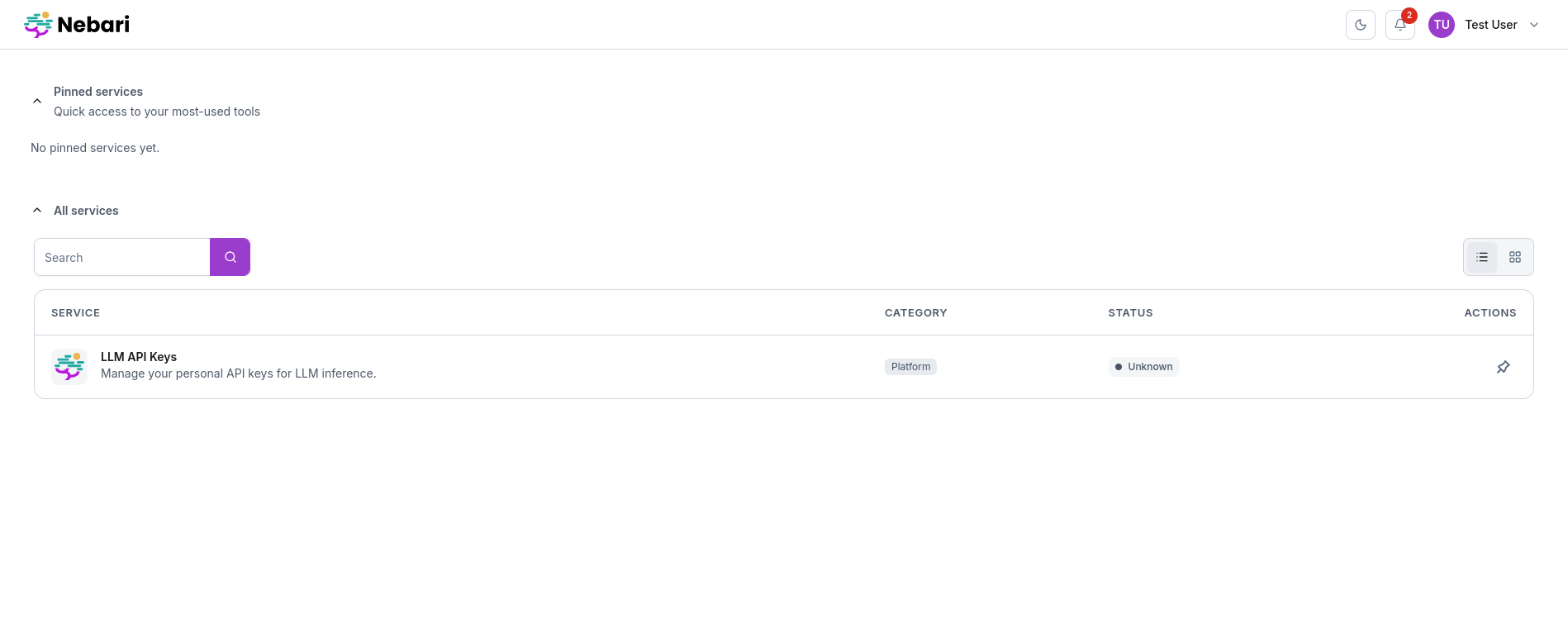
Click the tile to open the key-manager UI at
https://llm-keys.<baseDomain>/. The model should appear under “Available Models”.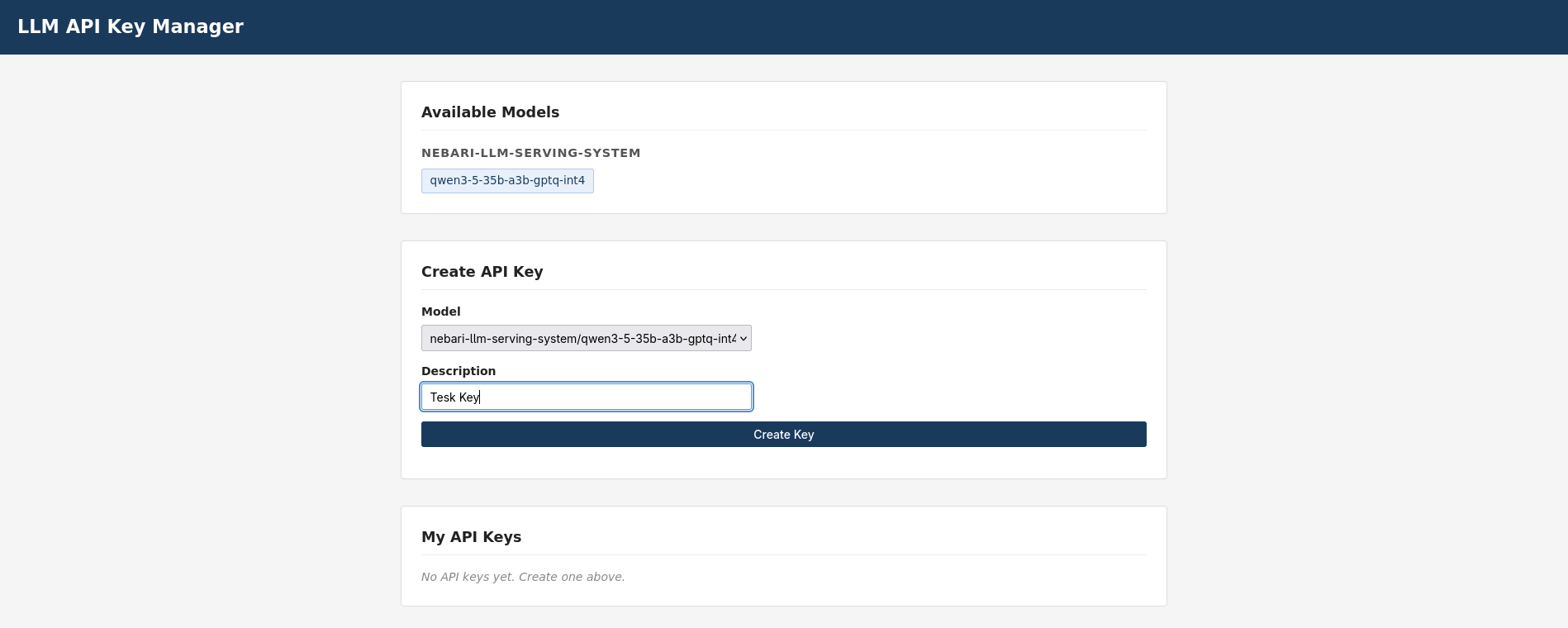
Select the model, enter a description, and click “Create Key”. Copy the
sk-...value - it will not be shown again.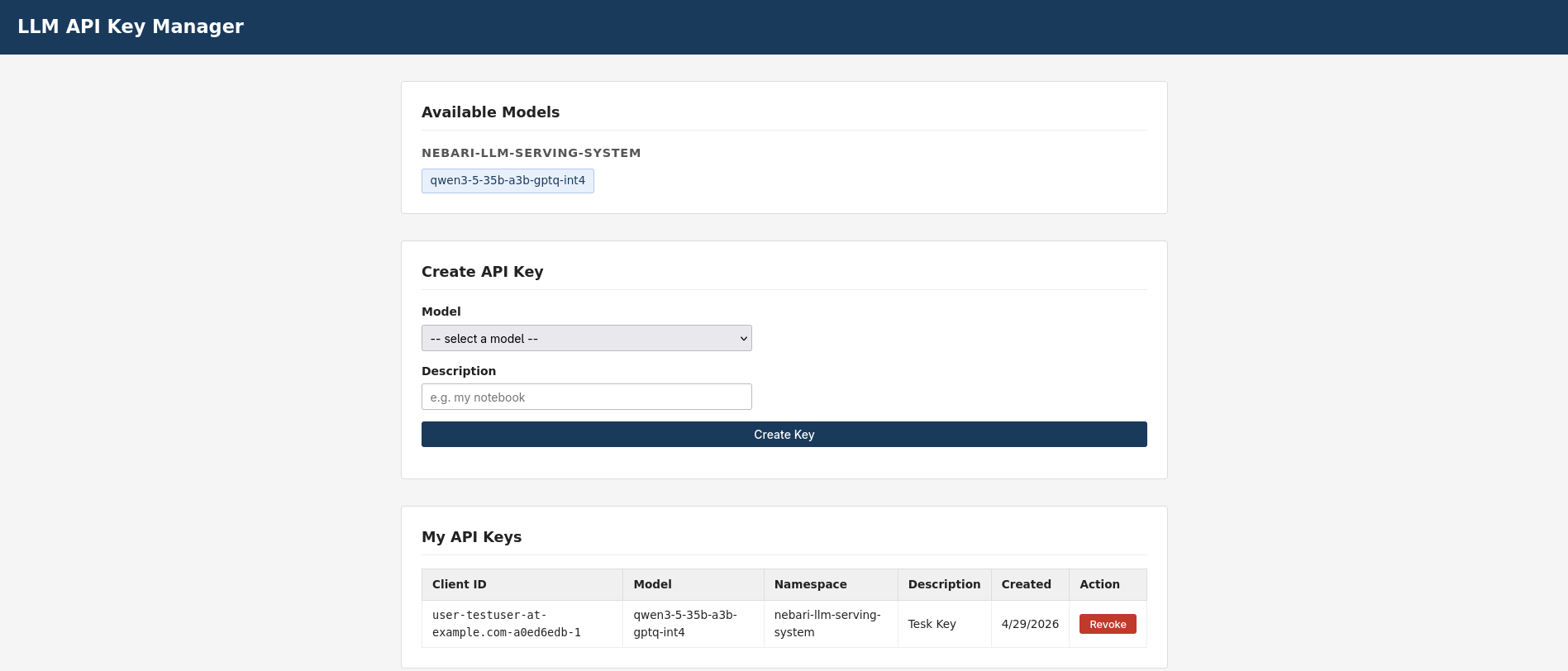
Verify the key was stored:
kubectl get secret -n nebari-llm-serving-system \
  -l app.kubernetes.io/name=llmmodel -o name | head
Expected: a Secret named <model>-api-keys.
11.3 Call the external endpoint #
curl -sS -X POST "https://llm.<baseDomain>/v1/chat/completions" \
  -H "Authorization: Bearer <your-sk-key>" \
  -H "Content-Type: application/json" \
  -d '{"model":"<huggingface-model-id>","messages":[{"role":"user","content":"Say hi"}],"max_tokens":10}'
Expected: HTTP 200 with a JSON body containing
choices[0].message.content. The model value in the request body
must match spec.model.name from the LLMModel CR (the full
HuggingFace model ID, e.g. Qwen/Qwen3.5-35B-A3B-GPTQ-Int4), not
the LLMModel metadata name.
11.4 Verify a non-allowed user is denied #
Create a second user with no group membership:
curl -sS -X POST -H "Authorization: Bearer $TOKEN" -H "Content-Type: application/json" \
  -d '{"username":"outsider@example.com","email":"outsider@example.com","emailVerified":true,"enabled":true,"firstName":"Outside","lastName":"User","credentials":[{"type":"password","value":"TestPass123!","temporary":false}]}' \
  "$KC_HOST/admin/realms/$KC_REALM/users"
Log into https://llm-keys.<baseDomain>/ as outsider@example.com.
The “Available Models” section should be empty - the outsider cannot
see any models and therefore cannot mint an API key.
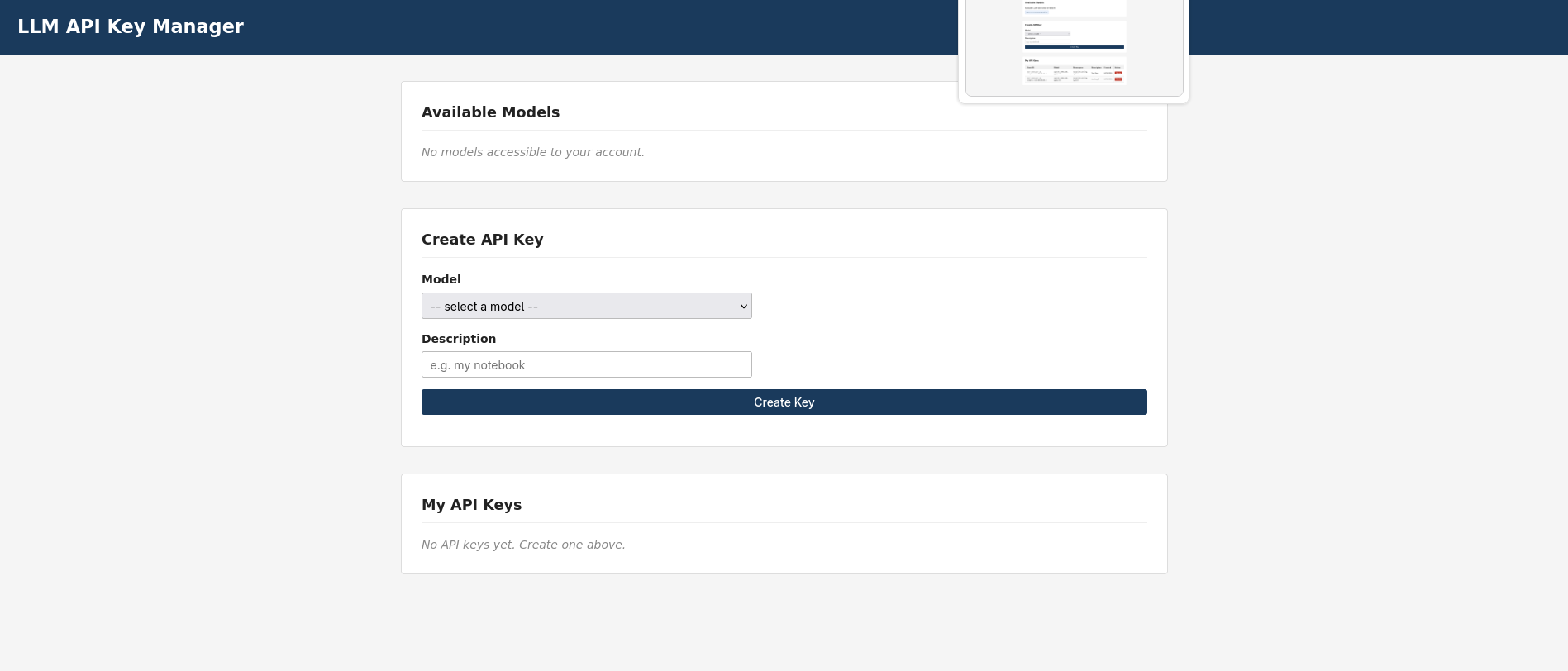
If the outsider somehow obtains a key or constructs a direct API call, the key-manager API returns HTTP 403:
# Via port-forward (bypasses gateway auth to test the key-manager directly):
kubectl port-forward -n nebari-llm-serving-system svc/nebari-llm-serving-key-manager 18080:8080 &
curl -sS http://localhost:18080/api/models -H "Authorization: Bearer <outsider-jwt>"
# Expected: {"models":[]}

curl -sS -o /dev/null -w '%{http_code}' -X POST http://localhost:18080/api/keys \
  -H "Authorization: Bearer <outsider-jwt>" \
  -H "Content-Type: application/json" \
  -d '{"modelName":"nebari-llm-serving-system/<model>","description":"should fail"}'
# Expected: 403
12. Required pre-steps and known issues #
These are issues discovered during the fresh-install validation that require manual intervention until upstream fixes ship. Each links to a tracking issue. Once the fix ships, the pre-step can be removed from this runbook.
12.1 NIC certificate stuck on fresh install #
Symptom: After a fresh NIC deployment, nebari-gateway-cert in
envoy-gateway-system stays Ready=False with a failed ACME order.
The gateway’s HTTPS listener has no usable cert and external
connections are refused.
Tracking issue: nebari-dev/nebari-infrastructure-core#267
Workaround: Delete the Certificate and let ArgoCD recreate it:
kubectl delete certificate -n envoy-gateway-system nebari-gateway-cert
# ArgoCD selfHeal recreates it; wait for Ready=True (~2 min)
kubectl get certificate -n envoy-gateway-system nebari-gateway-cert -w
NIC should ship with cert-manager.maxConcurrentChallenges: 1 to
prevent HTTP-01 solver races on overlapping SANs
(nebari-dev/nebari-infrastructure-core#259).
12.2 SecurityPolicy uses in-cluster Keycloak URLs for browser-facing endpoints #
Symptom: The key-manager UI redirects the browser to
http://keycloak-keycloakx-http.keycloak.svc.cluster.local:8080/...
instead of the public https://keycloak.<baseDomain>/... URL. The
OAuth2 flow dead-ends because browsers cannot resolve in-cluster
hostnames.
Tracking issue: nebari-dev/nebari-operator#110
Fix: Requires nebari-operator >= v0.1.0-alpha.19 (PR #111).
This version uses KEYCLOAK_EXTERNAL_URL for
authorizationEndpoint and endSessionEndpoint (the two endpoints
the browser hits) while keeping tokenEndpoint and issuer as
in-cluster URLs (back-channel only).
If your NIC ships an older nebari-operator, override the image in your NIC kustomization or ArgoCD values until the fix is released upstream.
12.3 AI Gateway webhook certificate becomes untrusted after pod rescheduling #
Symptom: The envoy proxy deployment
(envoy-envoy-gateway-system-nebari-gateway-*) is stuck at 0/1
with FailedCreate. ReplicaSet events show:
failed calling webhook "ai-gateway-controller.envoy-ai-gateway-system.svc.cluster.local":
x509: certificate signed by unknown authority
External connectivity is completely down (NLB target groups have zero registered targets).
Root cause: The AI Gateway controller generates a self-signed CA at startup and patches the MutatingWebhookConfiguration with the CA bundle. When the controller pod is rescheduled (e.g. after a node replacement), the new pod may generate a new CA while the webhook config retains the old one.
Workaround:
kubectl rollout restart deploy -n envoy-ai-gateway-system ai-gateway-controller
kubectl rollout status deploy -n envoy-ai-gateway-system ai-gateway-controller
# The envoy proxy pod should recover within ~30 seconds
kubectl get deploy -n envoy-gateway-system -w
Note: This needs further investigation to determine whether it is an upstream AI Gateway bug or a configuration issue. A tracking issue will be filed once the root cause is confirmed.
13. Troubleshooting #
For extended troubleshooting guidance see Troubleshooting.
direct_response: 500 on /v1/chat/completions
#
The Envoy proxy is returning a 500 before the request reaches the
AI Gateway extension processor. Common cause:
extensionApis.enableEnvoyPatchPolicy or
extensionApis.enableBackend is missing from the envoy-gateway
config. Re-check section 6.
401 on external endpoint with a valid API key
#
- Verify the API key Secret exists:
kubectl get secret -n nebari-llm-serving-system <model>-api-keys - Verify the key is for the right model (keys are per-model)
- Verify the
modelfield in your request body matches the HuggingFace model ID (e.g.Qwen/Qwen3.5-35B-A3B-GPTQ-Int4), not the LLMModel CR name
Key-manager UI shows “No models available” for a user who should have access #
- Confirm the user is in the correct Keycloak group (
llmor whichever group is in the LLMModel’sspec.access.groups) - Check that the
groupsclaim is present in the user’s JWT: decode the token and look for"groups": ["/llm"] - Verify the key-manager pod logs:
kubectl logs -n nebari-llm-serving-system deploy/nebari-llm-serving-key-manager --tail=20
Gateway listener shows Programmed: False
#
kubectl get gateway -n envoy-gateway-system nebari-gateway \
  -o jsonpath='{range .status.listeners[*]}{.name}: {range .conditions[?(@.type=="Programmed")]}{.status} {.message}{end}{"\n"}{end}'
Common causes: the referenced TLS Secret does not exist (cert not yet issued), or there is a hostname conflict with another listener.
vLLM pod stuck in Pending
#
- Check
kubectl describe pod <pod>for scheduling failures - Common causes: no GPU node available, PVC not bound (wrong storageClass), insufficient CPU/memory
- For single-GPU nodes: only one model can run at a time. A rolling
update will deadlock if the new pod cannot schedule alongside the
old one (the new pod stays
Pendingwhile the old pod holds the one GPU). On the nebari pack the operator enforcesspec.serving.replicas, so scaling the Deployment to 0 (or settingreplicas: 0) is reverted within seconds. Instead, after applying the respec,kubectl delete pod <old-pod>to free the GPU and let the new pod schedule.
Model downloads slowly or times out #
The init container downloads the model from HuggingFace on first deploy. Large models (30GB+) can take 10-20 minutes on typical network connections. Check the init container logs:
kubectl logs -n nebari-llm-serving-system <model-pod> -c model-downloader -f
If the download fails, the pod will restart and retry. For gated
models, you need a HuggingFace token in the LLMModel CR’s
spec.model.secret.
Envoy proxy pod has no ai-gateway-extproc container
#
The AI Gateway mutating webhook only injects the sidecar when an
AIGatewayRoute exists and the webhook is healthy. If the proxy pod
was created before the AI Gateway controller was ready, delete the
proxy pod to trigger re-injection:
kubectl delete pod -n envoy-gateway-system \
  -l gateway.envoyproxy.io/owning-gateway-name=nebari-gateway
vLLM pod crashloops with ld: cannot find -l:libcuda.so.1
#
Seen on k3s / host-managed driver nodes (section 3.0) running the
llm-d-cuda image. The traceback often surfaces as Model architectures [...] failed to be inspected because Triton’s JIT
import crashes during vLLM’s model-arch inspection. The pod has only
the utility driver capability, and even with libcuda.so.1
injected it lands in a directory ld does not search. Fix: add
NVIDIA_DRIVER_CAPABILITIES=all and
LIBRARY_PATH=/usr/lib/x86_64-linux-gnu to
spec.advanced.vllm.extraEnv on the LLMModel - see the callout in
section 9.2.
A related symptom on the same nodes is vLLM logging Failed to infer device type: the pod was scheduled on the default runc runtime,
which exposes no GPU. Make nvidia the default containerd runtime or
ensure the pod uses runtimeClassName: nvidia (section 3.0/3.4).
ai-gateway-controller crashloops (PostRouteModify SIGSEGV) after deleting a model
#
ERROR controller.inference-pool failed to sync InferencePool
  {"error": "ExtensionReference service <model>-epp not found ..."}
panic: runtime error: invalid memory address or nil pointer dereference
  ... extensionserver.(*Server).PostRouteModify ...
Deleting an LLMModel removes its vLLM and EPP Deployments/Services,
but does not garbage-collect the per-model gateway resources
(InferencePool, AIGatewayRoute, HTTPRoute) - they have no
owner-ref back to the CR. The orphaned InferencePool keeps an
ExtensionReference to the now-deleted <model>-epp Service, and the
AI Gateway controller nil-derefs on it and crashloops. Delete the
leftovers by hand, then restart the controller:
NS=nebari-llm-serving-system; M=<model>
kubectl delete inferencepool $M -n $NS
kubectl delete aigatewayroute $M-external $M-internal -n $NS
# deleting the AIGatewayRoutes cascade-deletes their HTTPRoutes
kubectl rollout restart deploy/ai-gateway-controller -n envoy-ai-gateway-system
Confirm recovery: the controller logs should show only the live
model’s InferencePool being reconciled, with no panic.